Select or search for the article you want to edit and click to open it. All editable fields can be updated directly, and the changes are saved automatically.
Compare with published data
If you want to compare your changes with the already published information, click Show published data (Visa publicerad data). This makes it easier to see what has been updated.
Publish changes
When you are satisfied with your updates, click Publish (Publicera).
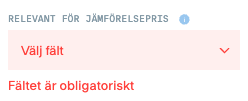
If any fields are incorrectly filled in or missing information, they are marked in red. You must correct all errors before the article can be published.
Each tab that contains errors is marked with a red indicator and a number showing how many errors there are.
On the page itself, incorrect fields are clearly highlighted in red so that you can easily find and correct them.
Draft
When you make changes to a published article, a draft is automatically created. You can delete a draft at any time without affecting the already published information.